- contact@verticalserve.com
- Part of the Insight insurance suite — InsightUW · InsightCW · InsightCede · InsightPulse
Docs
Getting started with InsightCW
How to run it, what each concept means, and how the agents, the people and the record fit together.
Overview
InsightCW is a claims workbench for specialty P&C in which ten agents work every claim and people make every decision that matters.
There are three parts. The API (Python, FastAPI) holds the claims record on PostgreSQL and runs the agents, the rules and the integrations. The worker runs the background jobs: the outbox to the other products, state clocks, the pull-back sweep and the agents’ hourly roll-up. The UI (React) is the adjuster’s workbench. Identity, workforce, tasks, documents, notifications and the agent framework come from the shared Insight platform packages.
flowchart LR
  UI["React UI
Claim Workspace · desks · admin"] --> API["CW API
claims · agents · rules · copilot"]
  API --> PG[("PostgreSQL
claims schema")]
  W["Worker
outbox · clocks · pull-back · roll-up"] --> PG
  API --> LLM["Claude on Bedrock"]
  API --> PLAT["Insight platform
identity · workforce · agents · rules · decisions"]
  W -- "signed events" --> SUITE["InsightUW · InsightCede · InsightPulse"]
  XT["InsightXtract"] -- "signed callback" --> API
Run it
The API and the worker are one image with three entry points, which is also how the ECS task templates run them.
# 1. the schema (Alembic migrations)
python -m app.migrate

# 2. the API
uvicorn app.main:app --port 8000

# 3. the background worker (outbox, clocks, pull-back, roll-up)
python -m app.worker

# 4. the UI (development)
cd insightcw-ui && npm install && npm run dev
GET /api/ready answers once Postgres is reachable; logs are JSON with a correlation id per request.
Configuration
Every setting is an environment variable. Secrets are references resolved at run time from the secrets manager; none go in the image or in .env.
| Setting | What it does |
|---|---|
INSIGHT_DATABASE_URL, INSIGHT_DATABASE_SCHEMA | The platform Postgres and the claims schema. |
AWS_REGION | Turns the model on: Claude on Bedrock through the default AWS credential chain (an SSO profile locally, the task role in ECS). |
CW_CLAUDE_MODEL | Overrides the model. Agent steps default to Claude Haiku 5.5, the copilot to Claude Sonnet 5.5. |
CW_AGENTS_LLM, CW_COPILOT_LLM | Kill switches (0): the agents keep their rule-based findings and the copilot answers with facts only. |
CW_AGENTS_MAX_LEVEL | The carrier’s autonomy ceiling. Default L2. |
CW_AGENTS_AUTORUN | Run the agents on claim events. On by default. |
CW_AGENT_TOOLS_LIVE | Lets agents act through their tools at L3 and above; below that, or off, they prepare instead. |
CW_AGENT_BUDGET_DEFAULT_USD_DAILY | A daily model budget per agent; over it, the faster model answers. |
INSIGHT_PROMPTS_URL, CW_PROMPTS_PREFIX | Released prompts from InsightPrompts win over the local text. |
LENSE_ENDPOINT | A Lense trace per agent step and per copilot answer. |
INSIGHT_COMMS_DRY_RUN | Letters and emails are recorded, not sent. |
UW_BASE_URL, UW_POLICY_LOOKUP_SECRET, UW_CLAIMS_FEED_SECRET | InsightUW: the signed policy lookup and the claims feed back. |
CEDE_BASE_URL, CEDE_INTAKE_SECRET | InsightCede: signed claim events for cessions. |
PULSE_BASE_URL, PULSE_CLAIMS_FEED_SECRET | InsightPulse: the claims feed. |
XTRACT_CALLBACK_SECRET | InsightXtract’s signed callback with a notice read from a document. |
Your first claim
- A notice arrives — typed in, or read from an ACORD form by InsightXtract with each field’s confidence. Intake checks completeness, looks for duplicates and fetches the policy at the loss date.
- A person opens the claim from the notice. The claim gets its number, its coverages from the policy and an owner by the assignment rules.
- The agents run on their own because a notice became a claim. Open the Claim Workspace: the narrative says what they found, and Prepared for you lists what waits on you.
- Answer each one: Accept carries it out as you, Change carries out your version, Reject drops it, Ask gets an answer from the facts.
- Ask the copilot anything about the claim from the side panel.
- Move the claim along the stage strip; a refused move shows what is missing.
The Claim Workspace
One page per claim. The hero gives the line, number, owner, loss, incurred and policy, with the stage strip under it. Five zones follow:
- Decision — the agents’ narrative, what they prepared for you, what they found, what the rules found, the coverage position and the stage actions.
- Loss brief — what happened, the policy, parties, documents, what is missing, and the line handling panel.
- Reserve — reserves per feature and component, their history, the authority line and the worksheet.
- Resolve — payments with their controls, settlements, recoveries, litigation and the operations panels.
- Work — the diary, the file and the audit trail.
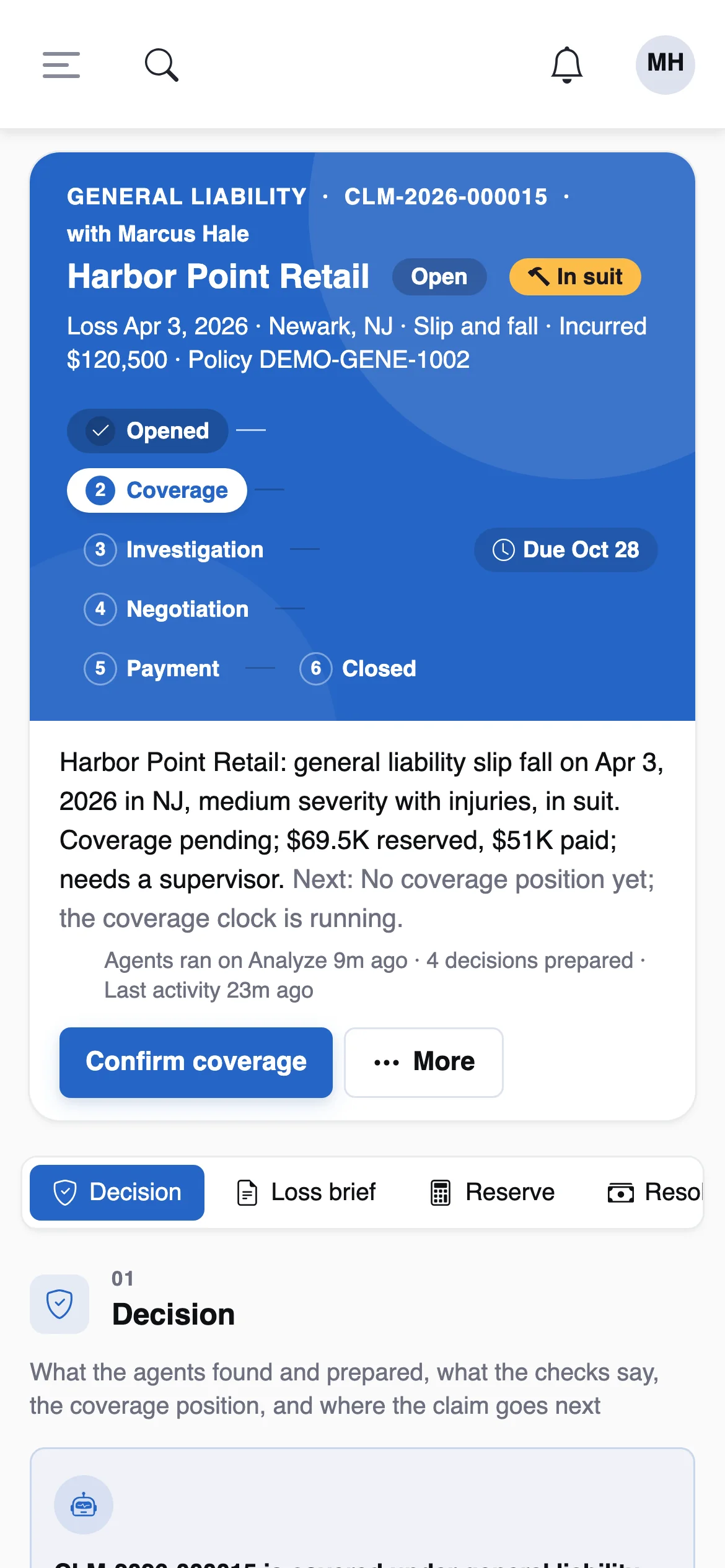
The same workspace at phone width.
Agents
Ten agents run in order on each claim: intake, coverage, reserving, fraud, subrogation, litigation, medical review, correspondence, supervisor and closure. Each one:
- Gathers its facts from the record, each with its source (the policy coverage, the reserve transaction, the document).
- Reasons with the model over those facts and answers in a fixed JSON shape that cites them by id.
- Is checked: invalid output or an ungrounded number means the model answer is discarded and the rule-based findings stand.
- Prepares decisions at the level its autonomy allows.
An agent step that does not apply (no suit for the litigation agent, no injury for medical review) says so and is skipped. Every step records its model, confidence, tokens, cost and time.
When they run
On five events — a notice converted to a claim, a document arriving, a reserve changing, a payment requested, a suit recorded — debounced to once a minute per claim, and whenever someone presses Analyze. What would they do? runs the same work as a dry run that writes nothing.
Autonomy
Each action has a level: L1 draft, L2 ask first, L3 act and tell (with a pull-back window), L4 act. The effective level is the lowest of the agent’s level for that line and action, the action’s hard cap and the carrier ceiling (CW_AGENTS_MAX_LEVEL, default L2). A kill switch drops an agent to L1.
Six actions are capped at L2 whatever the dial says: filing an SIU referral, deciding an approval, opening a subrogation opportunity, a defense review, a medical review, and closing a claim.
Promotion is earned. Every answer to a prepared decision is feedback; an hourly roll-up computes agreement over 30 days and recommends a promotion at 90% over at least 50 answers, which a manager accepts. Below 70% over at least 20 answers it demotes at once and tells the claims managers.
Prepared decisions
What an agent prepares for a person: a coverage position, a reserve change, a letter, a payment request, an SIU referral, an approval brief, a closing. Each shows the recommendation, the reasons and the facts behind them, and offers four answers:
- Accept — carried out as you, under your authority.
- Change — carried out with your edits (a different reserve, a different position).
- Reject — dropped, with your note.
- Ask — a question answered from the facts; it records no feedback.
The decision record
Each claim keeps one decision record: every Analyze run, every rule hit with its outcome, every agent finding with source agent, and every person’s answer as an event. Agents never change the verdict the rules reached; they add findings beside it.
Grounding
Every number the model writes must appear in the facts it was given; otherwise its answer is rejected and the rule-based text stands, labelled as such. Findings with no citation are dropped. Coverage positions can only move toward caution, and a denial with no policy form on file becomes a reservation of rights.
Why so strict? An adjuster can check a cited fact in one click; they cannot check a number that came from nowhere. A blunt rule that sometimes throws away a good answer is cheaper than one invented reserve.
The copilot
The side panel on every page. On a claim it plans, calls read-only lookups — overview, policy and coverage, reserves and payments, notes, diary and clocks, documents, the decision record, litigation recoveries and SIU, parties and approvals, similar closed claims — and answers with numbered sources. Figures are checked against what it read, privileged material is never returned, and suggested actions are links into the workspace.
Rules
The Rules Studio holds the claims rules as readable sentences: coverage referral, fraud, severity, assignment, large loss, recovery, bill review, auto-diary, SLA and payment control. Each can be tested against a real claim and its impact previewed before it is published; every save is a version. The Studio is the same one InsightUW uses.
Payments & clocks
Payment controls — sanctions screening, duplicate payments and 1099 reporting — run as rules when a payment is requested. A payment that trips one is held with its reason rather than failing or going out, and a supervisor, manager or compliance releases it.
State clocks start and stop on claim events and count business days on the desk’s calendar: acknowledge, decide, pay. The starter set includes illustrative clocks for California, Florida, Illinois, New York and Texas; confirm them against current regulation before relying on them.
The connected suite
- InsightUW — the policy and its forms as they stood on the loss date, by signed lookup; claims experience, alerts and deductible bills sent back for renewal.
- InsightCede — signed claim events become loss cessions; voids and recoveries reverse them; a catastrophe’s event loss is shown against each CAT XoL treaty.
- InsightPulse — the claims feed merged into the portfolio.
- InsightXtract — first notices read from documents, each field with its confidence and page.
Security
- Sign-in through the Insight identity platform (OIDC), with roles and API keys.
- Claim scope: adjusters see their own book; approvers reach a claim through its approval.
- Tenancy: every row belongs to an organization.
- An audit row for every change, including what an agent did, at what level and on whose behalf.
- PII masked before any prompt; per-agent budgets and a circuit breaker on each model.